| Webinar 5: Creating your first Power BI report |
|---|
| Have you ever been curious about your Netflix watch history? In this webinar we will cover the basics of finding data, cleaning, importing and visualising. |
Wise Owl welcomes you to this lunchtime webinar, showing you how to create a Power BI report based on your Netflix watch history.
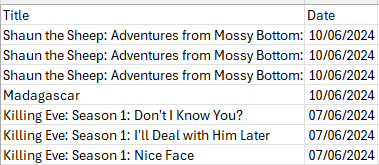
A watch history that most parents can relate to.
Power BI Desktop is free and can be installed via the Microsoft store. Let us show you how!
Date | 13th March 2026 |
Time | 12:15–1:15pm (perfectly timed for your lunch break) |
Location | Online via Teams |
Below is a list of topics that we will cover during the 1 hour session. The goal is to provide an understanding of what Power BI can do for you.
Topic | What we'll cover |
|---|---|
Introduction |
|
Working with data |
|
Creating table/matrix |
|
Choosing visuals |
|
Wrap-Up & Q&A |
|
You can sign up here to receive a message about this and future webinars. You’ll get an email with your Teams invite, and we’ll see you at lunchtime on Friday 13th March!
Some other pages relevant to this blog include:
You can also book hourly online consultancy for your time zone with one of our 7 expert trainers!